
What is the API in Tekla?
PMtech Engineering helps maximize Tekla Structures’ efficiency and BIM workflow for Tekla Structures users.
ADAPTED DEVELOPED TOOLS
Specially developed tools help your Tekla users become more productive by allowing them to work faster and with fewer mistakes. In many cases, it is faster, easier and even cheaper to buy a finished tool than to try to develop it yourself.
ADAPTED BUSINESS ENVIRONMENT
We help build your company a custom Tekla Structures environment according to your needs and standards. For example, modeling rules with pre-saved settings, report templates and different types of drawing layouts with automated marks and dimensions.
PMtech Engineering benefits:
Main task Do you want to start using Tekla to its full potential as quickly and as easily as possible? Give your business a huge boost at the beginning of your Tekla journey by using the Firm Environment template to establish your new environment almost instantly.
Description
Although Tekla Structures is one of the best and most capable structural BIM modeling tools on the market, it requires some enterprise-level localization to be able to use it to its full potential. This package gives you an optimal business environment as a basis so that you can start working as soon as possible. If you already have a business environment, this package will give you many add-ons to enhance your existing installation. Some changes may be needed, but do not worry;
PMtech Engineering BIM-programming services
- Develop software applications (C #, .NET) to be used in Tekla Structures open API;
- Develop software applications (C #, .NET or Python) plugins for use in Tekla Structures;
- Dynamo, grasshopper script;
- Revit computers via Autodesk Revit API;
- Tekla Structures data processing through the Tekla Structures API.
Examples of our automation tools are Tekla Structures (Open API).
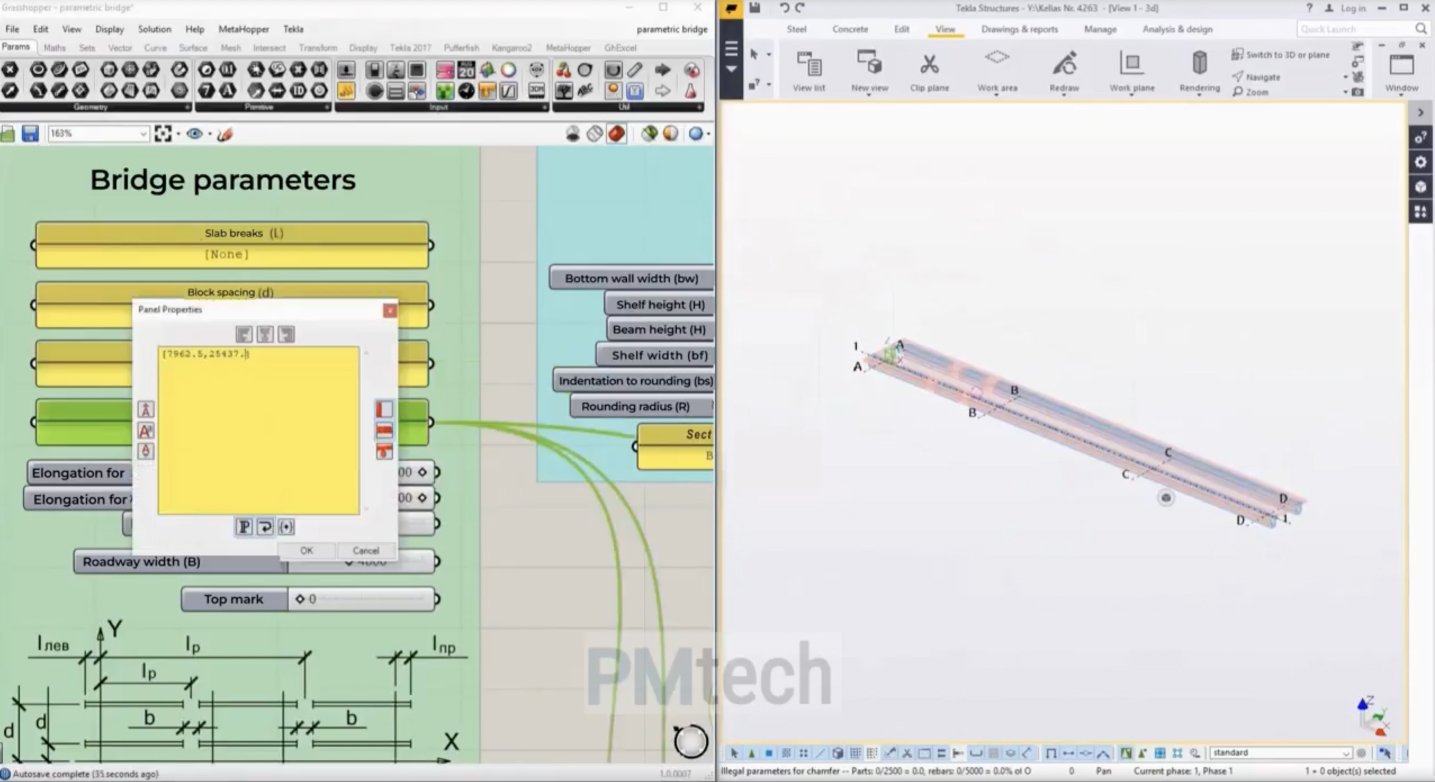
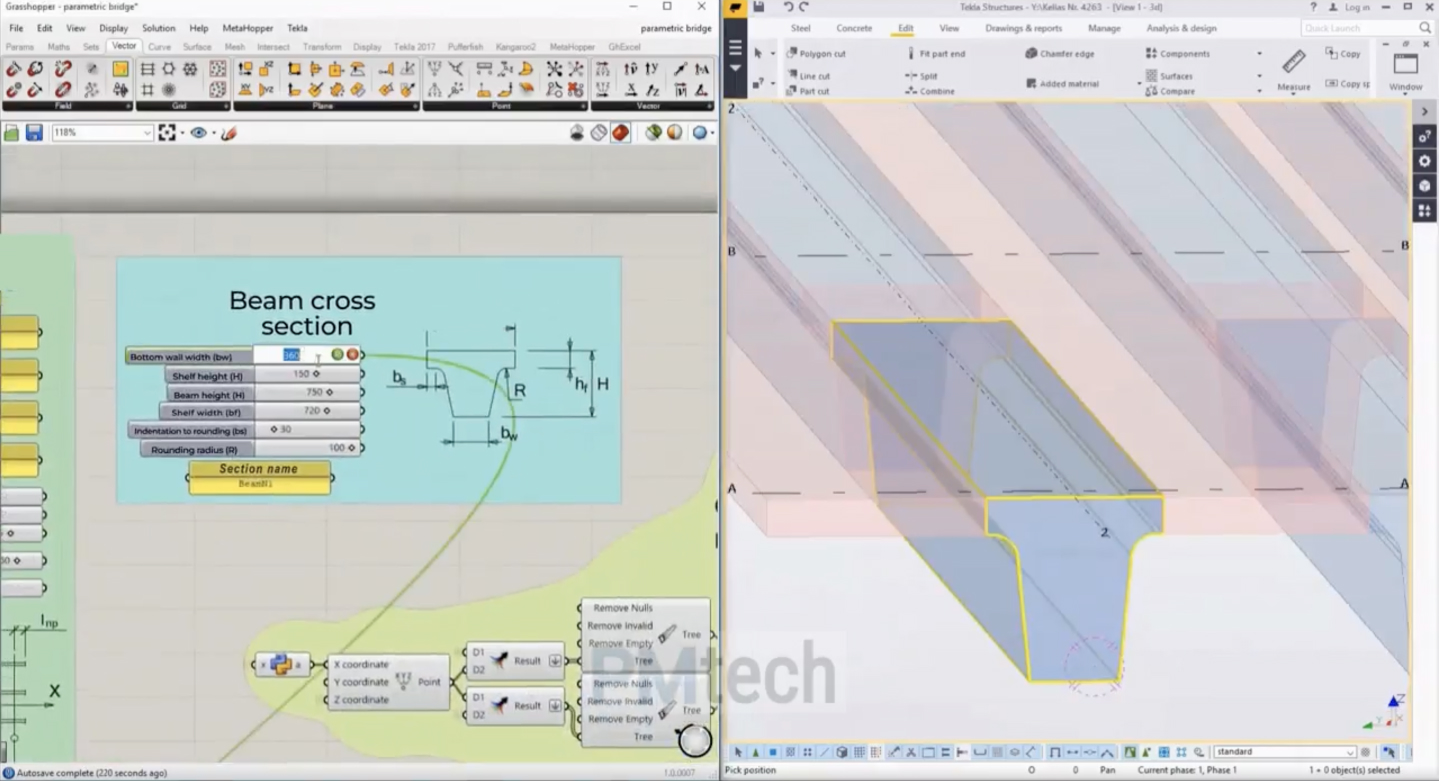
Automatic bridge design modeling with Tekla API.
An algorithm that, based on initial data, models the required number of spans with a given width of the bridge, with the ability to change the cross-section of the bearing elements and fill the space between them
Parametric design Grasshopper. Tekla Structures
Link to video – Algorithmic modeling and design for Tekla Structures using Grasshopper
Tekla, Navisworks
Tekla Structures

Bridge design modeling
An algorithm that, based on the initial data, models the required number of spans with a given width of the bridge, with the ability to change the cross section of the bearing elements and fill the space between them

Bridge beam custom component
A custom component for reinforcing the elements of bridge

Spacer with latches
The component creates a spacer in the opening with latches for the window, the indents and the number of latches are edited

Lifting eye
Lifting eye component, selectable size, angle of inclination, and position in the plane
Navisworks - Collisions

Navis. Collisions. Report. docx
“Navis. Collisions. Report. docx” – plugin allows you to generate a report of collisions in a Word file

Navis. Collisions. Grouping
“Navis. Collisions. Grouping” – plugin allows you to group collisions by models

Navis. Collisions. Cleanup
“Navis. Collisions. Cleanup” – plugin allows you to remove a “null” collisions

Navis. Collisions. Remaning groups
“Navis. Collisions. Renaming groups” – plugin allows you to rename collision groups by model names

Navis. Collisions. Generate Checks
“Navis.Collisions.Generate Checks” – plugin allows you to create a clash report on various model parameters

Navis. Collisions. Devations
“Navis. Collisions. Deviations” – plugin allows you to color elements depending on the amount of deviation
Attributes, Viewpoints

Navis. Attributes. Model Properties
“Navis. Attributes. Model Properties” – plugin allows you to generate an additional tab in the project properties “Model Properties”, which contains a saved set of parameters

Navis. Attributes. Selection Sets
“Navis.Attributes.Selection Sets” – plugin allows you to group models by a certain parameter of elements

Navis. Attributes. Check parameters
“Navis. Attributes. Check parameters” – plugin allows you to check the filling of parameters, with additional grouping by them

Navis. Attributes. Add property tab
“Navis. Attributes. Add property tab” – plugin allows you to generate an additional tab in the project properties with a custom name, in which the saved set of parameters is located

Navis. Viewpoints. Cleanup
“Navis.Viewpoints.Cleanup” – plugin allows you to delete viewpoints

Navis. Viewpoints. Group
“Navis. Viewpoints. Group” – plugin allows you to group viewpoints by model name
Tekla API & Automation Services
PMtech develops custom solutions for Tekla Structures that help engineering, detailing and construction teams automate repetitive tasks and adapt their working environment to specific project requirements.
Our Tekla API services include automation development, custom plugins and components, environment configuration, data processing and workflow optimisation.
We develop solutions for specific engineering and detailing workflows, from individual automation tools to more comprehensive Tekla customisation projects.
Tekla Structures Automation
We develop automation solutions for Tekla Structures to reduce repetitive manual operations and improve modelling and documentation workflows.
Depending on the project requirements, automation can be used for:
- automated modelling;
- repetitive modelling operations;
- object and property management;
- drawing and documentation workflows;
- data extraction and processing;
- report generation;
- project-specific engineering and detailing tasks.
Each solution is developed around the client’s existing workflow and the specific requirements of the project or organisation.
Custom Tekla Plugins and Components
PMtech develops custom plugins and components for Tekla Structures to extend standard software functionality and support project-specific workflows.
Custom solutions can be developed for engineering, precast and steel detailing tasks, including parametric components, reinforcement and embedded elements, automated modelling operations and other specialised functions.
The development approach depends on the required functionality, existing Tekla environment and intended use of the solution.
Tekla Environment Setup and Customisation
We help companies configure and customise their Tekla Structures environment for consistent modelling and documentation workflows.
The scope may include:
- modelling settings;
- custom components;
- drawing templates and layouts;
- reports;
- marks and dimensions;
- predefined project settings;
- environment configuration;
- workflow-specific customisation.
A customised environment can help standardise project workflows and make frequently used tools and settings easier to manage across teams.
Tekla API Integration and Data Processing
PMtech develops solutions for working with Tekla Structures data and connecting Tekla workflows with other processes and applications.
Depending on the requirements, this can include automated data extraction, processing and transformation, custom reporting and project-specific integrations.
Solutions can be developed for individual tasks or as part of a broader engineering, detailing or production workflow.
For broader BIM software development and automation solutions, see our BIM Applications Development services.
Examples of Tekla Automation Solutions
Examples of custom Tekla solutions developed by PMtech include:
Example 1
Automatic Bridge Design Modelling
Automation for generating bridge design models based on defined project parameters and input data.
Example 2
Bridge Beam Custom Component
A custom Tekla component developed for modelling and reinforcement of bridge elements.
Example 3
Spacer with Latches
A custom component designed for a specific reinforcement and precast detailing workflow.
Example 4
Lifting Eye Component
A parametric Tekla component with configurable dimensions, inclination and positioning.
Example 5
Automated Reports and Data Processing
Custom tools for extracting, processing and organising Tekla project data for reporting and documentation.
Tekla Solutions for Engineering and Detailing Teams
PMtech can work with engineering, precast and steel detailing teams to identify repetitive operations and develop tools that fit their existing Tekla Structures workflow.
The scope can range from a single custom component or automation tool to a broader programme of Tekla environment customisation and software development.
Discuss Your Tekla Automation Project
If your team uses Tekla Structures and you are looking to automate repetitive processes, develop a custom component or customise your Tekla environment, contact PMtech to discuss your requirements.